
Wildcat Reviews
  • Home Security
  • Wellness Gadgets
  • Air & Energy
  • Pet Tech
  • Coming Soon Scout
  • Type and hit Enter to search

    Wildcat Reviews
    • Home Security
    • Wellness Gadgets
    • Air & Energy
    • Pet Tech

    We earn commissions from brands listed on this site, which can influence how listings are presented. Advertising Disclosure

    Home Security

    The Best WiFi Smart Locks – Secure & Keyless Options

    Leonard Olson
    Leonard Olson
    January 2, 2026 9 Mins Read
    1.2K Views
    0 Comments

    🔄 Updated for 2026: This guide has been refreshed with the newest models, product updates and performance insights to help you choose the best wifi smart locks for your home.

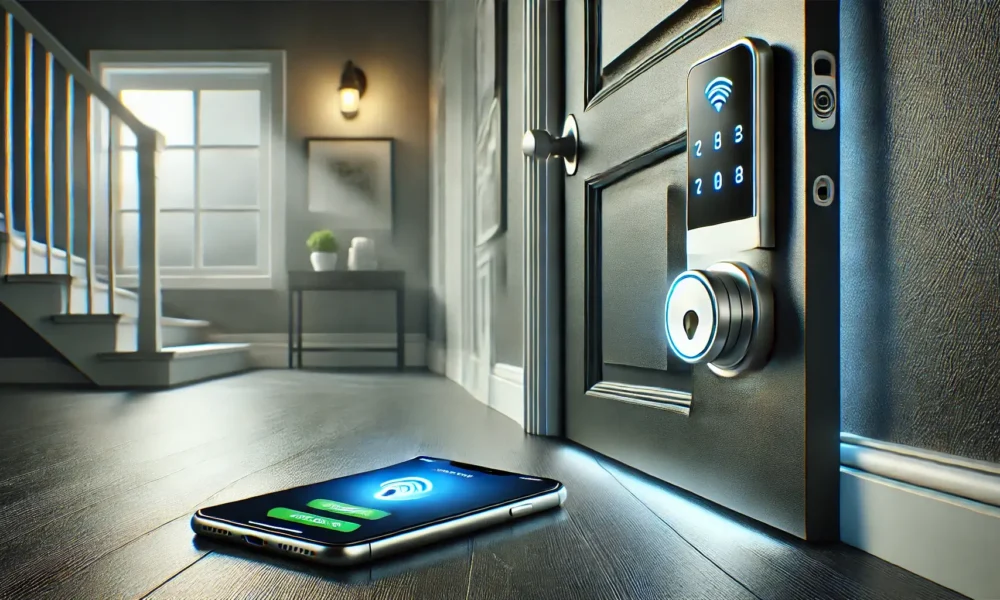
    A WiFi smart lock offers keyless convenience, enhanced security, and remote access, allowing you to lock and unlock your door from anywhere using a smartphone. Whether you’re upgrading your home security, managing Airbnb properties, or simplifying access for family members, a smart lock provides peace of mind and modern functionality.

    When choosing the best WiFi smart lock, factors like installation ease, security features, battery life, app compatibility, and integrations with Alexa, Google Assistant, or Apple HomeKit are crucial. Some models even offer fingerprint access, auto locking, and built in alarm systems for extra security.

    To help you find the right smart lock, we’ve reviewed the top 5 WiFi smart locks of 2026, comparing their features, performance, and best use cases.

    Ready to upgrade your home security? Let’s dive into the best WiFi smart locks available today!

    Quick Navigation

    • Our Top Picks
    • Comparison Table
    • Buying Guide
    • FAQs

    Top 5 WiFi Smart Locks of 2026

    From advanced fingerprint models to video integrated locks, these WiFi smart locks combine convenience, strong security and smart home compatibility. Each one has been tested for ease of use, reliability and overall value.

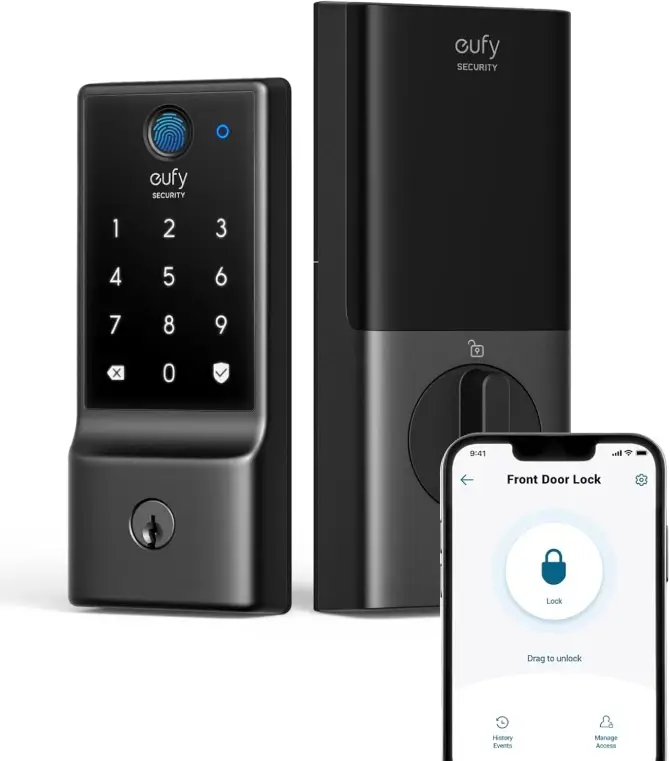
    #1 ⭐ 9.6/10 Excellent Smart Lockeufy Security Smart Lock C220

    eufy Security
    Smart Lock C220

    • Fingerprint and keypad entry for secure access without keys
    • Wi-Fi enabled for remote locking and unlocking via the eufy Security app
    • Weather-resistant construction — suitable for outdoor doors
    • Auto-lock feature helps ensure your door is always secured
    • Custom user codes with easy management in the app
    • Low battery alerts so you never get locked out unexpectedly
    • Backup key override for traditional access when needed
    ❌ Some advanced features require the eufy Security app and account setup for full access

    Check Price on Amazon
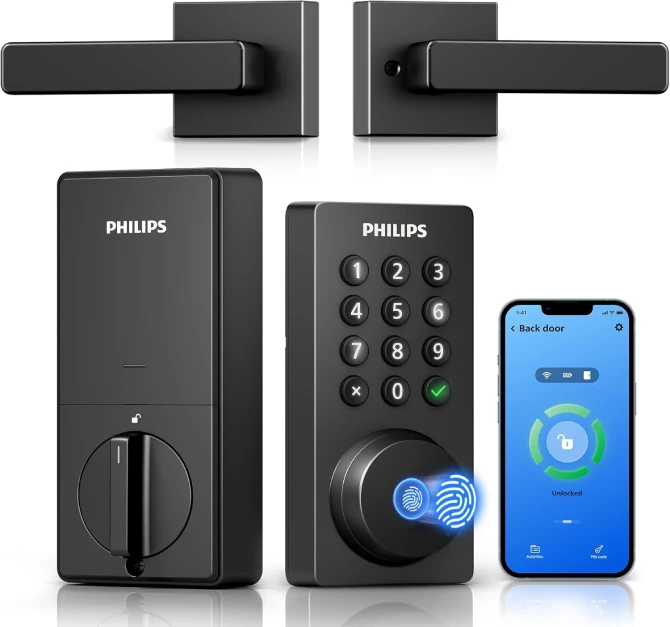
    #2 ⭐ 9.4/10 Excellent ValuePhilips Wi-Fi Smart Lock with Handle

    Philips Wi-Fi Keypad
    Door Lock with Handle

    • All-in-one smart lock with built-in handle for seamless keyless entry
    • Remote control via the Philips Home Access app from anywhere
    • Five unlock methods: fingerprint, PIN code, app, backup key, and voice assistant
    • Fast fingerprint recognition (0.3s) with high accuracy
    • Create custom access codes—temporary, recurring, or one-time
    • Auto-lock timer for extra security and peace of mind
    • Voice-assistant compatible (Alexa & Google)
    • Compatible with most standard U.S. doors
    • DIY installation—no professional needed
    ❌ Requires light drilling during installation for maximum stability

    Check Price on Amazon
    #3 ⭐ 9.2/10 ExceptionalULTRALOQ U-Bolt Pro

    ULTRALOQ U-Bolt Pro

    • 7-in-1 keyless via fingerprint, app, keypad, key, voice, watch
    • Remote access & control, share eKeys, and track access logs
    • Fast fingerprint 0.3s unlock speed with 99.8% accuracy
    • Auto-lock & auto-unlock on a timer as you approach
    • Advanced security ANSI Grade 1 certified
    • Weatherproof IP65-rated for heat, cold, dust, and water
    • Custom PIN codes up to 50 access codes and 100 fingerprints
    • Easy DIY installation Fits most US doors, installs in 10 minutes
    • Smart home with Alexa, Google Assistant, SmartThings & IFTTT
    ❌ WiFi limitation Requires a 2.4GHz connection for remote access

    Check Price Amazon
    #4 ⭐ 8.9/10 Good Value for Moneyeufy Smart Lock S330

    eufy Smart Lock S330

    • 3-in-1 security fingerprint unlock, 2K camera, and doorbell
    • Multiple unlock options, fingerprint, app, voice, keypad, or key
    • Remote monitoring door activity and manage access via app
    • Real-time alerts, instant notifications for visitors and motion
    • High-capacity battery 10,000 mAh rechargeable battery
    • Weatherproof design IP65-rated and in extreme temperatures
    • Easy DIY installation in 15 minutes with no drilling required
    • Expandable video storage up to 128GB microSD (not included)
    • Smart home integration with Alexa and Google
    ❌ MicroSD card not included for storage expansion

    Check Price Amazon
    #5 ⭐ 8.6/10 Budget OptionGeekTale 4-in-1 Keyless Entry Door

    GeekTale 4-in-1 Keyless Entry Door

    • 4-in-1 keyless entry via fingerprint, keypad, app, or backup key
    • 6-digit keypad and fingerprint access for extra protection
    • Smart app control, track unlock records, and set auto-lock
    • Guest access one-time passwords and manage up to 20
    • Auto-locking Set a timer to automatically secure your door
    • Wireless installation Installs in minutes, fits most US doors
    • No more lost keys Keyless convenience for everyday security
    • Durable and reliable for long-term use with strong materials
    • Local customer support Responsive service for troubleshooting
    ❌ No remote WiFi access Bluetooth control limits remote use

    Check Price Amazon

    How We Chose the Best WiFi Smart Locks

    • Access made simple: Keyless options like fingerprint, PIN, app, or voice that fit different households.
    • Security first: Strong build quality, ANSI certification, auto-lock, and tamper alerts for peace of mind.
    • Smart fit: Easy DIY installs, long battery life, and smooth integration with Alexa, Google, or Apple setups.

    Features Comparison: Find the Best WiFi Smart Lock for Your Home

    Choosing the right WiFi smart lock depends on security, ease of access, remote control features, and compatibility with smart home systems. For full protection many homeowners also install an indoor cam, here’s our guide to the best indoor security cameras to see which models pair well with smart locks.

    To help you make the best choice, we’ve compared the top 5 WiFi smart locks based on unlocking methods, security features, battery life, installation ease, and smart integrations. Check out the table below to find the perfect lock for your needs! 

    Smart LockImageUnlocking MethodsSecurity FeaturesBattery LifeSmart Home IntegrationInstallationBuy
    eufy Security Smart Lock C220eufy Smart Lock C220Fingerprint, keypad, app, keyAuto-lock, encrypted access, weatherproofUp to 8 monthsAlexa, Google AssistantDIY installationCheck price
    Philips Wi-Fi Keypad Door LockPhilips Wi-Fi Smart LockFingerprint, PIN, app, keyAuto-lock, intrusion alarms, remote alertsUp to 1 yearAlexa (through Philips app)Handle replacement installationCheck price
    ULTRALOQ U-Bolt ProULTRALOQ U-Bolt ProFingerprint, keypad, app, key, auto-unlockAnti-peep PIN, dual data encryptionUp to 1 yearAlexa, Google, IFTTTSimple deadbolt retrofitCheck price
    eufy Smart Lock S330 (w/ Camera)eufy S330 Smart LockFingerprint, keypad, app, key2K camera, motion detection, video historyUp to 10 monthsAlexa, Google AssistantDeadbolt replacementCheck price
    GeekTale 4-in-1 Keyless Door LockGeekTale Smart LockFingerprint, app, PIN, keyAuto-lock, tamper alarmsUp to 10 monthsAlexa (via Gateway)DIY handle/door installCheck price

    Customer Feedback Highlights

    Security Convenience Battery

    Summarized from recurring themes across public buyer comments and forums, not individual testimonials.

    ULTRALOQ U-Bolt Pro

    ANSI Grade Fingerprint Auto-Lock
    What users like
    • Fast, reliable fingerprint unlock and handy auto-unlock when you arrive.
    • Flexible access sharing with codes/eKeys and clear activity logs.
    Common trade-off
    • Requires 2.4 GHz Wi-Fi; setup can be finicky on mesh networks.

    Philips Wi-Fi Smart Lock

    Keypad Handle Alerts 1-Year Battery
    What users like
    • All-in-one handle design with PIN, app, and fingerprint access.
    • Easy code management for guests and clear notifications.
    Common trade-off
    • May need minor door adjustments; some report extra drilling.

    Veise Fingerprint Door Lock

    Budget PIN + Fingerprint Auto-Lock
    What users like
    • Good value for everyday keyless entry with quick fingerprint response.
    • Straightforward install and simple app controls for codes.
    Common trade-off
    • App and build feel more basic than premium brands.

    eufy Video Smart Lock S330

    2K Camera Fingerprint Rechargeable
    What users like
    • All-in-one lock + doorbell camera with fast biometric unlock.
    • Local storage option and helpful visitor/motion alerts.
    Common trade-off
    • Larger faceplate than standard deadbolts; battery needs periodic charging.

    GeekTale 4-in-1 Keyless Entry

    PIN + App Guest Codes Battery Saver
    What users like
    • Quick setup and dependable keypad access for families and guests.
    • Auto-lock timer and basic logs cover everyday needs.
    Common trade-off
    • Bluetooth-first design; no true remote Wi-Fi without a bridge.

    How to Choose the Best WiFi Smart Lock for Your Home?

    Choosing the right WiFi smart lock comes down to finding the perfect mix of convenience, reliability, and security. With so many options available, it’s worth taking a closer look at a few key features before deciding which one fits your lifestyle best.

    Start with how you want to unlock your door. The best smart locks give you multiple ways to get in like fingerprints, PIN codes, mobile apps, or even voice commands. If you often host guests or manage an Airbnb, look for a model that lets you share temporary digital keys or set time-based access.

    Smart home compatibility is another big factor. Locks that work with Alexa, Google Assistant, or Apple HomeKit make it easy to check and control your door from anywhere, or even include it in automated routines with your lights and cameras.

    Don’t overlook battery life because most quality locks last six months to a year, and many now include low battery alerts or rechargeable options to save on replacements.

    When it comes to security, prioritize locks with built-in features like auto-locking, tamper alerts, and anti-peep PIN protection. An ANSI Grade 1 or Grade 2 rating is a good sign you’re getting solid protection.

    For our final note, think about installation and durability. Most WiFi locks are DIY-friendly and designed to fit standard U.S. doors, but it’s always worth double-checking dimensions and latch types before ordering.

    Pro tip: For a complete entryway upgrade, pair your smart lock with a video doorbell camera or motion sensor light, or checkout our complete guide for home security systems and you can make the right choice. It’s the perfect combo for keeping your home secure and welcoming whether you’re home or away.

    Conclusion: Which WiFi Smart Lock is Right for You?

    Choosing the right WiFi smart lock comes down to how you want to balance convenience, security, and smart home features. Each model in our list excels in a different way, making it easier to match a lock to your household’s needs.

    If you want the most complete security upgrade, the eufy Security Video Smart Lock C220 stands out with its built-in camera, fingerprint scanner, and real-time alerts, a true all in one solution for monitoring and controlling your front door.

    For those who prefer sleek design with effortless, keyless entry, the Philips Wi-Fi Smart Lock delivers multiple unlocking methods and a modern handle style layout that fits seamlessly into most homes.

    Smart home power users may prefer the ULTRALOQ U-Bolt Pro, which integrates smoothly with Alexa, Google Assistant, and SmartThings while offering robust features like anti-peep PIN codes and auto locking.

    No matter your choice, WiFi smart locks offer a noticeable upgrade over traditional keys, giving you remote control, better security, and everyday convenience.

    To build an even stronger home entry system, consider pairing your lock with the best video doorbell, allowing you to both manage access and see who’s approaching your home. We’ve reviewed the top options to help you complete your setup.

    Frequently Asked Questions

    Are WiFi smart locks safe?

    Yes. Modern WiFi smart locks use advanced encryption and security protocols similar to online banking. Choosing a trusted brand with two-factor authentication, tamper alerts, and automatic lock features ensures high safety.

    Do WiFi smart locks work without internet?

    Yes, most models still work locally via Bluetooth or keypad even if WiFi goes down. However, you’ll lose remote control and real-time notifications until the internet connection is restored.

    How long does the battery last on a WiFi smart lock?

    Battery life typically ranges from 6 months to 1 year depending on usage and model. Locks with built-in video or WiFi modules (like the eufy S330) may need charging more often, while standard locks can last close to a year.

    Can I install a WiFi smart lock myself?

    Most smart locks are designed for easy DIY installation with just a screwdriver. You don’t need to modify your door unless you’re replacing a handle lock or upgrading from an older non-standard deadbolt.

    Do smart locks work with Alexa, Google, or Apple HomeKit?

    Yes. Many premium models integrate with Alexa, Google Assistant, and sometimes Apple HomeKit. This allows you to check lock status or control your door using voice commands or smart routines.

    What happens if the battery dies?

    Most smart locks will alert you when batteries are low. If they die completely, you can still unlock the door using a physical backup key or by connecting a temporary power source (like a USB battery pack).

    Can I give temporary access to guests or Airbnb visitors?

    Absolutely. WiFi smart locks let you create time-limited PIN codes or digital keys for guests, cleaners, or Airbnb guests — perfect for property owners who need remote access management.

    Photo of Leonard Olson, Editor & Lead Tester at Wildcat Reviews
    Leonard Olson
    Editor & Lead Tester

    About the author: Leonard tests and reviews smart home setups, wellness gadgets and pet products for Wildcat Reviews. He focuses on ease of setup, usability, and value, so you don’t waste money on hype! More about Leonard & Wildcat Reviews

    Tags:

    Alexa compatibleGoogle AssistantHomeSecuritysmart lock

    Share Article

    Next
    January 3, 2026

    The 5 Best Doorbell Cameras 2026 – Security & Smart Features

    Previous
    December 21, 2025

    Best Hair Scalp Massagers for Hair Growth: (2026) Top Picks

    No Comment! Be the first one.

      Leave a Reply Cancel reply

      Your email address will not be published. Required fields are marked *

      Related Articles

      07 Jan

      The 5 Best Air Purifiers – Tested for Allergies, Smoke and more

      Leonard Olson
      03 Jan

      The 5 Best Doorbell Cameras 2026 – Security & Smart Features

      Leonard Olson
      02 Jan

      The Best WiFi Smart Locks – Secure & Keyless Options

      Leonard Olson
      07 Dec

      Best Self Cleaning Litter Boxes for Large Cats – (2026 Expert Guide)

      Leonard Olson

      Get Every Newsletter

      Subscribe to our newsletter and stay updated.

      • Privacy Policy
      • Advertiser Disclosure
      • Terms & Conditions
      • Contact
      • About

      We use cookies and similar technologies to improve your browsing experience, analyze site traffic, and track affiliate links so we may earn commissions at no extra cost to you. By continuing to use our site, you agree to our Privacy Policy and Terms of Use.

      Wildcat Reviews

      Copyright © 2026 WildCat Reviews. All Rights Reserved

      • Home Security
      • Wellness Gadgets
      • Air & Energy
      • Pet Tech